

1. What is SFAM?
SFAM, stands for Sage Fixed Asset Management. The new Sage Intacct native SFAM module allows you to record and manage your fixed assets from within Intacct.
Remove Excel spreadsheets and save time at month/year-end with automation from acquisition to disposal; make informed decisions with rich, real-time reporting and insights and reduce monthly close cycles by as much as 50%- 90% with clear audit trails, secure data and total control over your processes.
KEY FEATURES
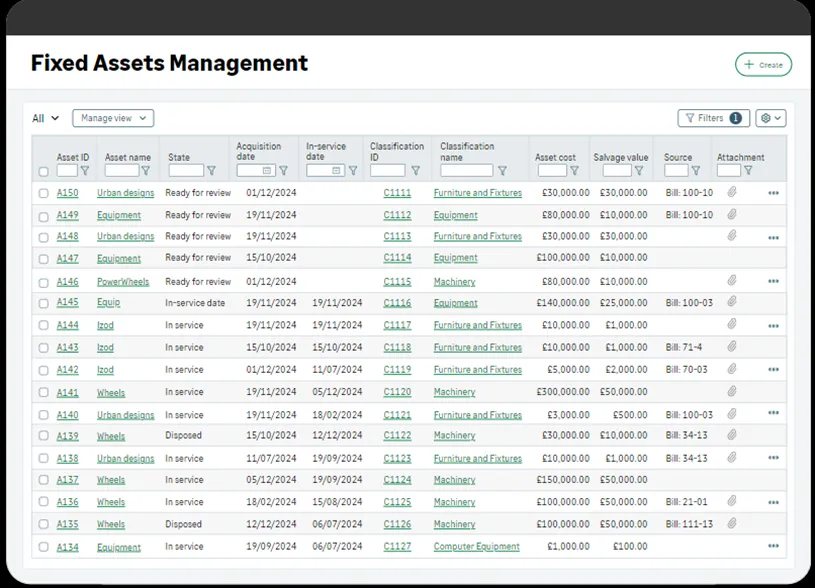
Track and manage assets
- Keep detailed records of all your fixed assets, including equipment, property, vehicles and more.
- Streamline your data entry process by creating assets directly from bills and vendor invoices.
- Easily access asset information such as acquisition date, cost, location, and useful life.
- Process and manage assets at the desired level within your organisation, ensuring privacy between entities and allowing employees to concentrate only on what they need.
DEPRECIATE ASSETS
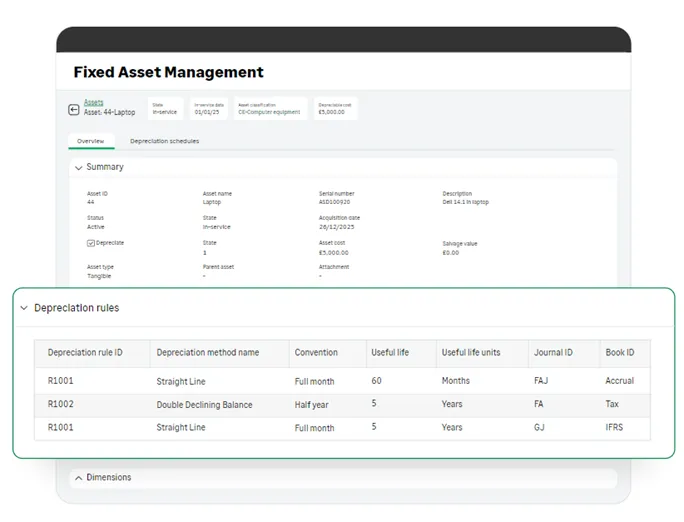
- Choose from a range of depreciation methods and conventions to meet your needs.
- Post depreciation automatically or manually.
- Post across multiple books, ensuring compliance with government regulations. Assets support multiple depreciation schedules, and each schedule can use a different depreciation method and book.
- Stay up-to-date on the status of your depreciation posting and receive automatic email notifications.
Gain new reporting and dimensional insights
- Tag the asset dimension on transactions across Sage Intacct to gain new visibility into your business. Capture how assets are distributed to departments, locations, project and more
- Generate depreciation forecast reports.
FIND OUT MORE
Contact us at Acuity24 to find out how you can implement SFAM with your Sage Intacct core accounting system and speed up your monthly close.