

The third Sage Intacct release of 2026 is here! The automatic update hit your screens on 7th August 2026 with even more new features and updates to make the most of!
Sage Intacct R3 2026: Our Top Highlights
You may have seen the announcement on your Sage Intacct homepage, these are our top highlights!
Note: Some permissions have been added and changed to support the new features. New Permissions are automatically “OFF” by default and will need switching “ON” to use the features.
1. Detect high-risk transactions and anomalies with AI driven detection
Accounts Payable and Purchase Ordering Automation uses AI driven anomaly detection to identify protentional transaction risks before payment, by analysing supplier billing patterns to flag unusual billing amounts and supplier email address.
When transactions are processed through AP Automation or Purchasing, Sage Intacct detects the following issues:
- Unusual transaction amounts
- Unrecognized supplier email addresses
- Multiple anomalies on the same transaction
Anomaly indicators appear in the Automated transactions list so reviewers can investigate potentially risky transactions before posting.
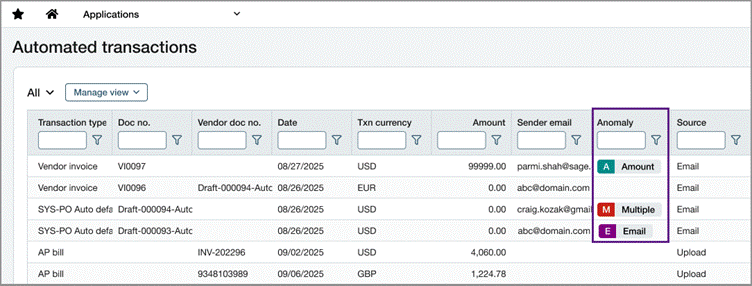
Good to know – The Anomaly column does not appear by default. Add the column to a custom view to display anomaly indicators.Anomalies are informational and do not prevent transaction posting.
2. Prevent automated purchase orders and invoices from unwanted email addresses
Block suspicious or unwanted email addresses from generating transactions in Sage Intacct through AP and PO Automation, allowing you greater control to reduce fraud, improve data quality all from a centralized admin point within the company settings.
To find out more details on the above new features – please visit here: Block email addresses from automated document processing
3. Other Accounts Payable Enhancements
There are a number of improvements to be aware of to improve ease of use in Accounts Payable including:
- Invoice Payment Enhancements – Process invoices faster with advanced filtering and dynamic sorting. Supporting up to 5000 AP invoices at a time. Pay AP purchase invoices enhancements—Phased rollout
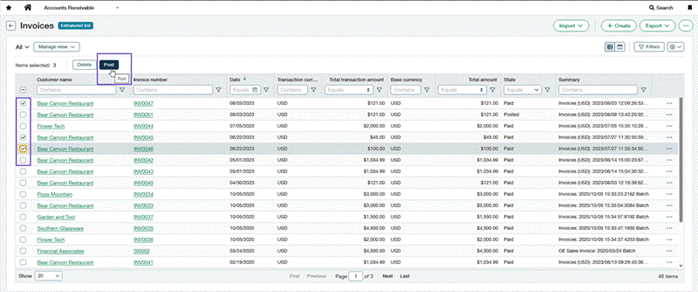
- Multiple Invoice postings -Save time by posting up to 20 AP invoices at any one time when you turn on enhanced lists.
Post multiple AP purchase invoices at the same time
- Simplify Bank file remittance email setup with preconfigured remittance email templates – Use preconfigured AP remittance email templates including entity level information, such as company name, address, and contact information in remittance emails.
- Make edits and skip approvals for “on Hold” and Billed AP Invoices – Update AP purchase invoice status without reversing or recreating transactions. Eligible edits do not restart the approval process and financial amounts and accounting data remain unchanged.
- Easily Identify customer refunds with new filtering and visibility options- customer refunds can now also follow the AP Supplier and invoice approval process, allowing you to reduce unnecessary steps and identify refunds easier. You can configure customer refund suppliers and AP purchase invoices to bypass supplier and AP purchase invoice approval workflows. Payment approvals still apply and cannot be bypassed.
Streamline customer refund processing in Accounts Payable
4. Post multiple sales invoices at the same time
You can now post sales invoices and adjustments in batches with the new enhanced AR lists. Update multiple transactions at once instead of modifying each one manually. Allowing you to efficiently manage large volumes of transactions as your organization grows.
5. Inter-Entity accounting and Entity level only
Generate bill back transactions at entity level rather than top level when one entity sells goods or services to another entity. Create AR sales invoices at the entity level and select the bill back options for the AR sales invoice. After posting, a corresponding AP purchase invoice is drafted in the entity that’s associated with the customer on the AR sales invoice
Too get inter-entity bill back for entity-level transactions turned on for your organisation you will need to contact Customer success or support.
6. Early billing insights prior to an invoice run
When using order entry billing groups, review billing information, charges and amounts prior to performing an invoice run, enabling you to catch and rectify any issues early. If using revenue management, invoices can be generated in a “Draft” state allowing you to allocate revenue recognition information before posting. Please see here for further information
7. Combine multiple orders and line items into a single transaction
This change to order entry and purchasing allows you to simplify your workflow by combining multiple documents and specific order line items into a single transaction, when using the convert functionality.
Currently when you move a transaction through a workflow, you convert one document to the next step, as defined in the corresponding transaction definition. However, the convert functionality only allows you to convert one full document at a time. Now you can choose to convert one or more orders at a time, including specific lines from different orders.
Example: You have a recurring sales order for monthly plant maintenance service delivery, billed quarterly. When you send the customer the quarterly invoice, you want it to include billing for 3 months of service delivery.
In Order Entry, you’ll create an AR sales invoice and select the customer. Then you’ll select each monthly billing order to include on the invoice. When each month’s order is selected, the service line detail is automatically listed and available to select.
See here for steps on how to configure – A new way to combine multiple documents into a single transaction
8. Clearer Bank reconciliation information
New statuses and display fields make it easier to identify when the last bank feed and the bank transaction date was last reconciled using the bank feed.
Last reconciliation type—new statuses
The new possible statuses for the ‘Last reconciliation type’ field are as follows:
- Banking cloud: Bank feed or Bank transaction assistant (BTA) file import
- Classic import: Classic import experience
- Manual: Manual transaction matching
These are all the possible statuses and replace all previous statuses.
Bank feed date fields—new display
‘Last bank feed date’ and ‘Last bank feed transaction date’ display dates only if the account was last reconciled using a bank feed.
- Previously, these fields displayed dates if the account was last reconciled using either a bank feed or BTA file import.
9. Multiple improvements across Fixed Asset Management
There are a number of improvements to be aware of to improve ease of use in Fixed Asset Management including:
- Reverse Asset Disposals: Reversing fully and partially disposed assets create offsetting journals and fully restores that asset and depreciation to its previous state before disposal.
- Revert Summarized Depreciation Postings: Reduce general ledger volumes with summarised depreciation postings, this new enhancement also provides flexibility to revert individual depreciation postings that are included in a summarised posting.
- Roll forward report customisation: include additional dimensions and add additional asset fields directly to the roll forward report
- Switch between Reverse and Return configurations: You can now switch between the Revert and Reverse correction treatment options at any time. Changes apply only to future transactions.
- View Parent & Child relationships in the Asset List: Quickly understand asset hierarchies without opening individual asset records. You can now view parent-child asset relationships directly in the Assets list.
Further information on the Fixed Asset enhancements can be found Here
10. Updated navigation to bring Sage products together
Swiftly move between Sage applications and access Sage tools with the updated global navigation bar.
Existing Sage Intacct workflows, settings, and product navigation are unchanged. This update affects only the top-level header.
The navigation bar now includes the following components:

- App launcher: Access other Sage products available to you.
- Product and company information: Quickly identify your product, company, and environment.
- Copilot: Get AI-powered assistance while you work.
- Collaborate: Connect with colleagues and shared workspaces.
- Help and Support: Access documentation, training, and support resources.
- Announcements and Resource Centre: Stay up to date with product news and resources.
- User menu: Manage your account settings and preferences.
The entity switcher, environment indicator, and other Intacct-specific controls remain available.
11. Additional security measures to control Sender and Reply to Email address for Sales invoices and Statements
Improve security by ensuring that Invoices and Statements are sent from validated email addresses across users and documents. When you email an AR sales invoice or statement, the “Sender” and “Reply to” fields are now dropdown lists that are populated only with allow‑listed sender email addresses. Your admin can set up the Allowed email address list.
By replacing free‑text entry with selections from the approved allow list, this update ensures that only authorised, validated email addresses can be used in your customer‑facing communications.
12. Additional reporting periods in performance cards for easy comparisons.
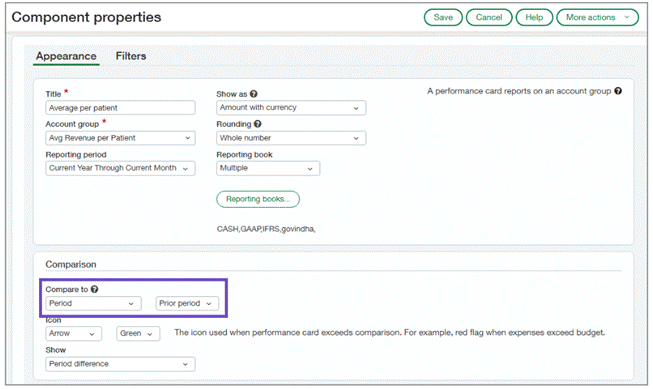
In this new release, Sage have added additional options to the performance cards within the dashboards, meaning that you can now easily compare data over cumulative reporting periods.
When you select one of the following reporting periods, you can now use the prior period for comparison by selecting Period in the Compare to field:
- Current Year Through Current Month
- Current Year Through Prior Month
- Current Year Through Prior Quarter
- Fiscal – Current Year Through Current Month
- Fiscal – Current Year Through Prior Month
- Fiscal – Current Year Through Prior Quarter
COMING SOON
Within this release Sage have announced lots of exciting new features currently in the Early Adopter phases. You can read more about these and how to get involved in the release notes.
As an early adopter, you can influence how Sage develop the product working closely with Sage Intacct product managers to ensure focus is on what matters most to you. Early adopter participants are expected to periodically respond to surveys and provide input.
Some of these programmes include:
Custom Purchasing approvals—Early Adopter
Reduce manual effort while strengthening control over purchasing approvals and helping to support compliance.
Configure custom approval workflows for Purchasing transactions using flexible, rule‑based logic. With custom Purchasing approvals, administrators can define approval rules based on supplier attributes, payment priority, and transaction amounts to automatically route Purchasing transactions to the appropriate approvers.
To be considered for the Early Adopter program, complete this form today.
Enhancements to Cash Intelligence – Early Adopter
In previous release Sage added the ability to send automatic payment reminders directly from the Cash Intelligence page – If you are participating in this Customer Payment Services EA Programme and have also subscribed to a payment provider, these reminders will include a “Pay Now” link on the invoice for customers to submit payments instantly.
How it works
- Enroll in the Customer Payment Services EA program.
- Subscribe to your preferred inbound payment service provider and configure Customer Payment Services.
- Go to Cash Management > All > Cash intelligence.
- Create payment reminders.
No additional setup is required. Your payment reminder emails now include a secure link allowing customers to make payments directly through Sage Intacct.
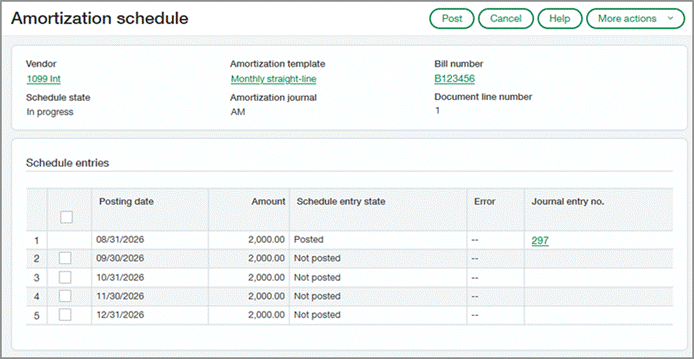
Automate Prepaid Expense Amortisation – Early Adopter
Eliminate manual tracking of prepaid expenses and automate expense recognition over time. You can now apply amortization details to AP purchase invoices and purchasing transactions, and Sage Intacct automatically creates an amortization schedule using the Straight-line method. This improves accuracy and helps ensure that prepaid expenses are recognized in the appropriate accounting periods.
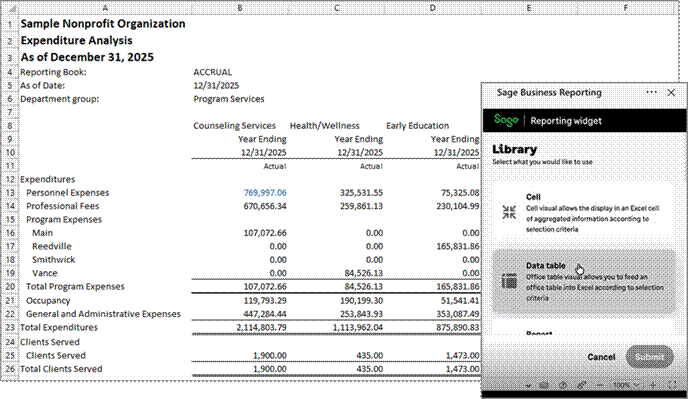
Smart Excel Reporting – Early Adopter
Use Sage Financial Data to build reports directly in Microsoft Excel.
The financial data remains linked to the Excel report so that you can refresh it with the latest information as needed. Sage Intacct security permissions are applied for the linked data through Excel.
Key benefits
- Easily build Excel reports using Sage Intacct data.
- Refresh Excel report as needed for the latest information.
Sign up for Early Adopter access. If you’re selected for the program, you’ll receive an email outlining the program details, expectations, and next steps.
As part of the program, you’ll collaborate closely with the Product Manager and play an active role in sharing feedback about your experience.
No more spoilers!
The above are a few of our favourite changes in the latest release. More details can be found on all of these plus more when you login to your Sage Intacct homepage. Alternatively, you can find further information by joining us at our Learning lab on Thursday 27th August at 12pm. Register Here or click here 2026 R3 Release Notes to read more about Release 3 2026
Should you want to discuss any of the changes or have any question please feel free to send us a message at customersuccess@acuity24.com or call us on 01932 237110.