

Our Top Highlights
Sage Intacct’s first release of 2026 is here!
The automatic update hit your screens on February 13th 2026 with even more new features and updates to make the most of!
You may have seen the announcement on your Sage Intacct homepage, these are our top highlights!
1. New Features for AP Automation
In this release there has been a variety of updates to the Sage Intacct AP Automation feature, these include:
Improve accuracy with AP Automation Line Level Matching
Line level matching ensures that every invoice line is matched to the right PO and receipt line, making invoice matching faster, smarter, cleaner and also giving your team instant visibility of what has been ordered and what has been received.
Your email domain for AP Automation is changing
Notify your suppliers of this email address update. After you’re on the new email domain, your email addresses change from @sagemail.com to @ai.sage.com. Emails sent to the previous email address will be forwarded to the new domain for a period of time. Find out more here and read FAQ’s here.
AP Automation now predicts tax details
Now AP Automation predicts tax details for automated transactions, reducing manual data entry and improving automation efficiency. This enhancement applies to both transactions that have a single line that summarises the total and transactions that include all line items and associated amounts.
To find out more details on the above new features – please visit here: 2026 R1 Release Notes.
2. Keep track of your Customer Health with Customer Health Insights
Introducing 3 new fields on your customer record to help you track and score your customer health. They’re designed as building blocks that your integrations, imports, and workflows can populate and use. Customer health scoring fields include;
- Health Score
- Health Status
- At Risk Churn
Please get in touch or see here for further details: Customer health insights.
3. Instant awareness with Improved notifications for recurring schedules in AP and AR
You will now receive email notifications when a recurring transaction does not generate as expected. Helping you quickly identify issues and reducing the risk of missed transactions.
For information see Improved notifications for recurring transaction schedules in AP and AR.
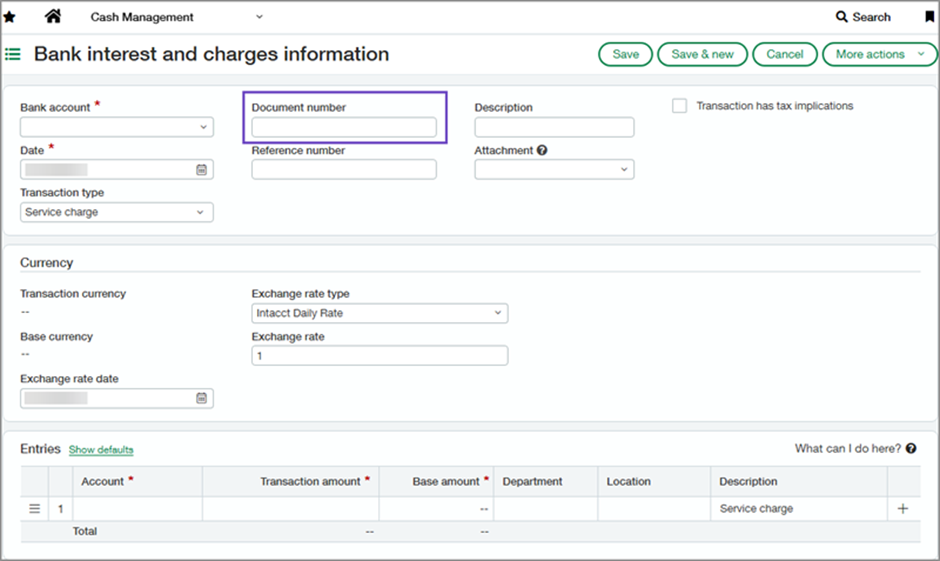
4. Enhance reconciliation accuracy using document numbering for Bank interest and Charges
When reconciling bank accounts you can improve accuracy by using the new document numbering on the bank interest and charges page.
This field is shown on all pages and reports that include a document number, for example the Bank interest and charges information page.
Benefits Include:
- Accurate Bank Reconciliations
- Faster Matching
- Improved data accuracy and fewer errors
- Audit Trail
Please see here for further details: Improve reconciliation accuracy by using the document number for bank interest and charges.
5. Import data using the bank transaction assistant from the banking cloud page
When using the bank transaction assistant for data imports, the transactions now appear in the banking cloud tab of your account, the same as the bank feed data improving consistency across the system.
How it works:
- Use the Bank transaction assistant to import your bank file.
- Create an assignment rule to assign the imported file to the appropriate account.
- Reconcile the account.
Please see here for further information File import data from Bank transaction assistant now appears on Banking cloud tab.
6. Entity visibility automatically included in the bank register report
The Bank Register report now automatically includes the entity’s location when run from within an entity, preventing errors related to missing locations.
- Go to the entity for which you want to generate the Bank Register report.
- Do one of the following:
- Go to Cash Management > All > Reports > Registers > Bank.
- Go to Reports > All > Reports centre and open the Bank Register report definition.
When the report page opens, the Location field in the Filters section is already populated with the location for the entity.
7. New HSBC SEPA file formats
Sage Intacct now supports the new HSBC SEPA payment file formats, which includes the accounts, supplier or employee address details in the file. The SEPA file format supports payments in EUR currency for banks in France and the UK.
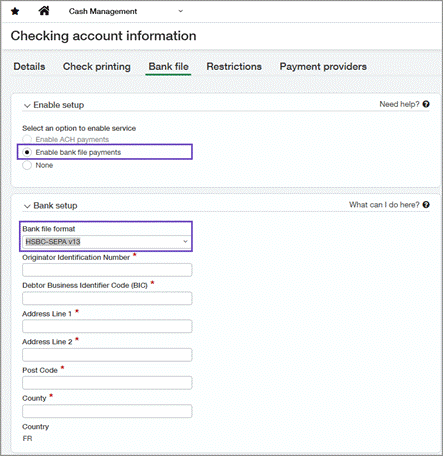
For configuration and details on how this works – please see here New bank file format for HSBC SEPA
8. Fixed Asset Accounting Updates
In this release there has been a variety of updates to the Sage fixed asset module, these include:
- Update asset cost using AP adjustments: Change an asset’s cost directly from an AP adjustment. Unposted depreciation is recalculated automatically for accuracy and ease.
- Roll Forward report: Generate a standardised roll forward report with opening and closing balances for asset costs, depreciation, and net book value.
- Flexible Asset GL account assignment: Assign the same Asset GL account to multiple asset classifications and use the new Asset classification
9. Streamline your end-to-end reconciliation process with GL account reconciliations
Enhancements to GL account reconciliations make it simpler and faster to match offsetting debit and credit entry lines, Sage have also added a new GL account Reconciliation report.
Key benefits
- Makes it easy to find unmatched entries so that you can focus on exceptions.
- Improves audit clarity with a documented history of matched lines.
For further information please read here; Announcing GL account reconciliations.
10. Streamline billing for customers with similar invoicing needs with billing groups
You can now group customers, apply common charges, and automate invoice generation all in one place with billing groups. This reduces manual work and helps ensure consistent, accurate billing across customers.
Key Benefits
- Centralise and scale billing: Group customers with similar billing preferences and manage shared billing cycles.
- Configure charges once: Set up recurring or one‑time charges and apply them consistently across all group members.
- Automate recurring invoices: Generate invoices automatically on a set schedule, reducing manual effort and improving consistency.
- Eliminate manual workarounds: Replace repetitive invoice setup, external spreadsheets, and multi‑step processes with a streamlined workflow.
Find out how it works here: Streamline billing with customer billing groups
11. Easily update multiple projects and fields simultaneously
The new Manage Projects feature allows you to filter projects and update multiple project fields across several projects simultaneously with efficiency and ease.
Previously, you were unable to update the records for multiple projects in a single procedure. The new Manage Projects feature solves this pain point and provides:
- Streamlined project management.
- Improved performance with faster load times.
- Improved overall user experience.
Key Benefits
- Enhanced scalability and improved project performance.
- Increased productivity for Project Managers and Controllers.
- Easily filter for projects that need to be updated.
- Efficiently update any number of records across multiple projects with ease.
12. See NET and TAX in a single line when Order Entry and Purchasing transactions are converted to AP and AR invoices
Order Entry and Purchasing transactions with VAT and GST now display net and tax in a single line when you convert them to Accounts Payable and Accounts Receivable transactions. Custom tax reports also show net and tax in the same line. This change provides a clearer view for transaction details and aligns the experience with direct AP/AR postings.
Key Benefits
- Clearer transaction details: No separate lines for net and tax, everything is in one place.
- Improved reporting: Custom tax reports now also show net and tax in the same line.
- Consistent experience: Matches the behaviour of direct AP/AR postings and cash basis tax capture in France.
13. Get insights into your upcoming tax submission with new tax box reports
Get insight into your upcoming tax burden with the new tax box report feature. This enables you to calculate your tax burden for a defined period without closing your books when using any standard or custom tax solution. You can also select a standard or custom tax solution and run a tax box report on an existing tax submission.
The tax box report gives you the flexibility to create reports that match the VAT and GST returns required by your tax authority. Creating these reports is a three-step process: first you define the tax detail boxes to include in the report; then you define the tax box report format; and finally, you run the tax box report when you want insight into your company’s tax burden.
More information can be found here, Configure and run tax box reports—General availability.
14. New training material added
Further training courses and videos have been added to the Sage University and video library.
Sage Intacct have also released a new format of the Sage Intacct fundamentals course, where this is now split into 5 separate courses, allowing you the flexibility to complete the topics that best apply to your role.
The new courses will be:
- Managing Journal Entries and the General Ledger (NA and UK)
- Managing Cash (NA and UK)
- Running Reports in Sage Intacct (NA and UK)
- Processing Accounts Receivable (NA and UK)
- Processing Accounts Payable (NA and UK)
Check out the new product videos added to the video library here: New training and videos
COMING SOON
With this release Sage have announced lots of exciting new features currently in the Early Adopter phases. You can read more about these and how to get involved in the release notes.
As an early adopter, you can influence how Sage develop the product working closely with Sage Intacct product managers to ensure focus is on what matters most to you. Early adopter participants are expected to periodically respond to surveys and provide input.
Some of these programmes include:
Finance Intelligence agent—Early Adopter
The Finance Intelligence agent is your Sage Ai-powered partner that helps you find answers about your financial data and complete tasks faster. Using Sage Copilot, you can ask questions, get insights, analyse data, and take actions all by using natural language.
Key Benefits
The Finance Intelligence agent enables you to:
- Retrieve and aggregate data instantly across your financials.
- Perform analysis to uncover what’s driving the numbers.
- Get predictions and recommendations for better decision-making.
- Understand the “why” behind every answer with clear, transparent reasoning.
If you would like to be considered to be an early adopter of the Finance Intelligence Agent, take this short survey.
Introducing Cash requirements with expanded currency support—Early Adopter
Explore the new Cash requirements feature and join the Sage Intacct Early adopter program. Cash requirements now supports all available currencies, with improved short-term payables forecasting.
View amounts for payables, receivables, and bank balances on a single page to help efficiently surface cash flow insights.
Key benefits
- Optimised cash management: See cash balance and forecasted change to understand your weekly cash position.
- AI-powered cash analysis: Leverage Copilot insights to quickly interpret short-term cash requirements and risks.
- Faster payment decisions: Identify potential shortfalls impacting upcoming cash obligations to prioritize payments with confidence.
If you want to be considered for the Early Adopter program, complete this form today.
No more spoilers!
The above are a few of our favourite changes in the latest release. More details can be found on all of these plus more when you login to your Sage Intacct homepage. Alternatively, you can find further information by joining us at our Learning lab on Thursday 26th February at 12pm. Register Here or click here 2026 R1 Release Notes to read more about Release 1 2026.
Should you want to discuss any of the changes or have any question please feel free to send us a message at customersuccess@acuity24.com or call us on 01932 237110.