Sage Intacct 2026 Release 4: Our Top Highlights
The final Sage Intacct release of 2026 is here! The automatic update hit your screens on 6th November 2026 with even more new features and updates to make the most of!
You may have seen the announcement on your Sage Intacct homepage, these are our top highlights!
Note: Some permissions have been added and changed to support the new features. New Permissions are automatically “OFF” by default and will need switching “ON” to use the features.
1. The Finance Intelligent Agent is now available for all.
The Sage AI Finance intelligent Agent that helps you find the answers about your financial data is now available to everyone.
Key benefits
The Finance Intelligence Agent provides the following benefits:
- Comprehensive data retrieval: Retrieve and aggregate data across Sage Intacct.
- Easier analysis: Perform analysis automatically so you see what’s driving the numbers.
- Trend discovery: Identify potential trends to support your decision-making process.
- Clear explanations: Understand the “why” behind every answer with clear, transparent reasoning.
- Better decision making: Get predictions and recommendations to guide better decisions.
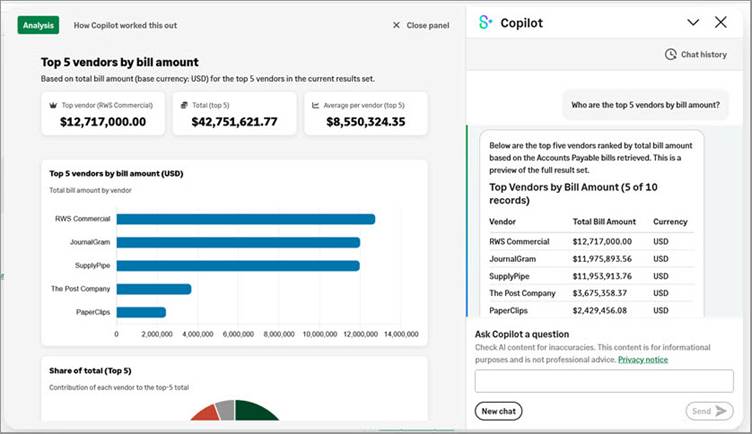
For more information on how to setup and watch a video of the Finance intelligent agent features see here Finance Intelligence Agent—General availability
2. Simpler GL Account reconciliations
With the improved GL account reconciliations, you can now simply match transactions confidently, and with full audit visibility of the reconciliation activity.
Key benefits
- Easier transaction matching: Additional information in the Transactions list helps you identify and match transactions with confidence.
- Simpler setup: You no longer need to worry about enabling GL account reconciliation for Order Entry and Purchasing offset accounts.
- Better reporting: You can now add the match date to custom reports and the Reporting Object API.
Additional columns added to the transaction list enabling you to quickly access details such as;
- Customer
- Supplier
- Document Number
For further information on the new GL Account Reconciliation feature, please visit here; Updates to GL account reconciliations
3. Accounts Payable Enhancements
There are several new features and enhancements to be aware of to improve ease of use in Accounts Payable automation and purchasing including:
- Manage multi Entity invoices at top level with entity coding – Post entity emailed transactions at top level whilst controlling how line locations are assigned.
KEY BENEFITS:
- Support multi-entity workflows: Create transactions at the top level while maintaining entity-specific coding.
- Control location assignment: Choose whether line locations use the entity associated with the email address or a predicted entity based on transaction content.
- Upload Memo fields in PO Automation -Save time as Intacct now populates the purchasing memo fields with the descriptions extracted from uploaded documents.
- Preserve document details: Capture descriptions from uploaded documents instead of relying only on default item descriptions.
- More informative transactions: Provide additional context within Purchasing transactions to support review and approval workflows.
- Honor inherited document numbers from automated purchasing transactions – When a transaction definition is configured to inherit the source document number, AP Automation with Purchasing now honours that setting. Generated transactions use the document number from the matched source transaction instead of being assigned the next available document number.
For further information on any of the above features, please visit here; Other enhancements to AP Automation and Purchasing
4. Reimburse your employees expenses through accounts payable.
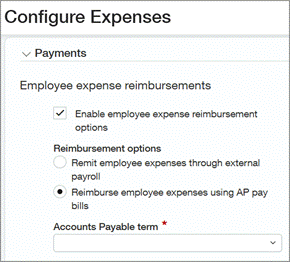
Reimburse employee expenses through Intacct Accounts Payable or remit your employee’s expenses through your external payroll provider.
This update helps align employee reimbursements with your existing payment process while improving control and visibility over expense payments. Previously, you could reimburse employee expenses using the legacy reimbursement option.
Key benefits
- Work with familiar processes: Use existing payment workflows by reimbursing employees through Accounts Payable or payroll.
- Gain greater financial oversight: Improve financial visibility and control with reimbursement activity tracked through standard Accounts Payable and payroll processes.
- Adapt to your business needs: Increase flexibility by allowing you to choose the reimbursement method that best fits your company’s processes.
5. Void refunds linked to supplier invoices
When you void refunds created in Accounts Receivable, the linked AP purchase invoice is also reversed if it’s in Draft or Posted state. This means that you do not have to make any manual adjustments in Accounts Payable or request additional permissions.
When you void a refund, the linked AP purchase invoice is reversed if it is in Draft or Posted state, even if you do not have the AP purchase invoice reversal permission.
If the linked AP purchase invoice is going through an approval process, you must wait until the approval process is complete before you can void the refund that generated it.
When you void a refund, the status of the refund changes to Voided, the status of the linked AP purchase invoice changes to Reversed, and an entry is added to the audit trail.
When you issue customer refunds in tax-enabled companies, the related AP purchase invoice is created without tax implications and the customer is refunded the full tax-inclusive credit amount in Accounts Receivable. This applies to adjustments, credit notes, and negative AR sales invoices.
To find out how the void refunds work and further details please visit; Updates to Customer refunds
6. Streamline your inter-entity accounting with entity transactions
You can now streamline your inter-entity accounting when your organisation transacts at the entity level only. Inter-entity bill back accurately records transactions between two entities in the same organization. When one entity sells goods or services to another, the receiving entity automatically gets an AP purchase invoice to process and pay. This ensures both sides of the transaction are recorded correctly.
Previously, inter-entity bill back supported top level transactions only.
With this enhancement, you can do the following:
- Post AR sales invoices for bill back in the respective entity.
- View the resulting bill back transaction details when you select the Record generator ID link in the AR sales invoice.
7. Upload bank payments to the cloud
Save payment files to your online cloud storage through a secure connection, enabling your team to send files faster and without manual download, enabling traceability and enforced validation for your bank.
Cloud Storage file options supported are:
- HTTP
- Dropbox
- Google Drive
- Box
- Amazon S3
- OneDrive
- Azure storage
Key benefits
- Reduce manual steps: With cloud delivery, you no longer need to first download the file locally.
- Improve payment monitoring and timing: Upload and track the status of the file in real time without leaving Sage Intacct. After the file is delivered, access the file in cloud storage for bank submission.
8. Mix and Store letters and numbers in your bank account number.
You can now include letters and numbers in the account number field of your bank, Previously accounts only allowed this to be completed in a numeric format.
Key benefits
- Comply with bank requirements: Set up current accounts and savings accounts as required by your bank without a limitation to only numeric characters in the Account number field.
- Simplify bank account set up: Experience less friction when creating bank accounts.
9. Manage project costs at your preferred level of detail of your work in progress
Having been through the early adopter programme and generally released to all you can now choose the level of detail to use in WIP schedules for viewing project costs and entering PM cost forecasts.
Entering more detail can help you go beyond seeing how your projects are performing, and gain insight into the reasons for their performance.
For further information on the benefits and how to manage your project costs please see here: Work with project costs at your preferred level of detail in work in progress (WIP) management—General availability
10. Exciting new enhancements to fixed assets
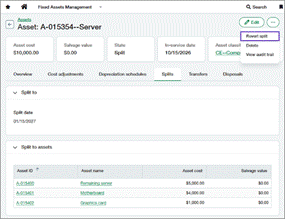
Revert Assets Splits
Easily undo asset splits that were created by mistake without manual adjustments or workarounds. Reverting a split deletes the assets created by the split and restores the original asset to its state before the split.
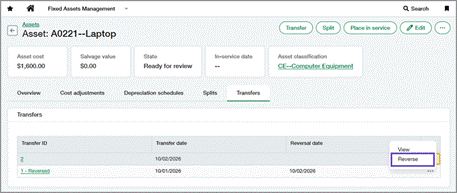
Reverse Asset Transfers
Reverse asset transfers in Fixed Assets Management to restore an asset’s previous dimensions and correct transfer errors. Unlike reverting a transfer, reversing preserves the original transfer record and accounting activity while creating an offsetting journal entry that clearly records the correction.
Display Depreciation details in the Roll forward report
The Roll Forward report now includes depreciation rule and depreciation schedule fields. To add these fields to the report, select the fields from Additional fields to display and set the Report type to Detail. These fields provide greater visibility into the depreciation settings and balances associated with each depreciable asset.
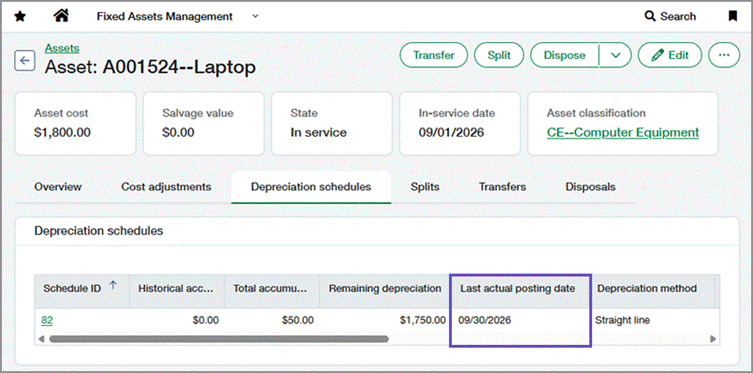
View Depreciation posting dates in the depreciation schedule
The Depreciation schedules tab on the asset record now includes a Last actual posting date column. The column displays the actual posting date of the most recent depreciation entry in the Posted state, making it easier to see when depreciation was last posted.
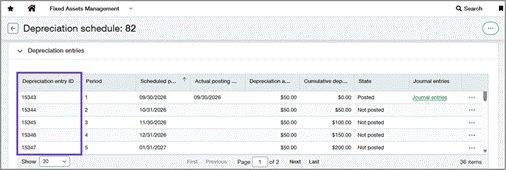
View Depreciation entryID’s in the depreciation schedule
Depreciation schedules now include a Depreciation entry ID column. Use the ID to more easily identify and track depreciation entries across depreciation schedules, the Post Depreciation page, and bulk action runs.
COMING SOON
Within this release Sage have announced lots of exciting new features currently in the Early Adopter phases. You can read more about these and how to get involved in the release notes.
As an early adopter, you can influence how Sage develop the product working closely with Sage Intacct product managers to ensure focus is on what matters most to you. Early adopter participants are expected to periodically respond to surveys and provide input.
Some of these programmes include:
Custom approvals for sales invoices and order entry transactions —Early Adopter
Create, manage and track custom approval workflows for AR sales invoices and order entry transactions from a centralized Custom Approvals Application.
What’s new
Custom approvals for AR sales invoices introduce a new Custom approvals application, configurable approval rule sets and policies and permissions that give administrators control over how AR sales invoices are routed and approved.
To be considered for the Early Adopter program, complete this form today.
Split Multi-page documents into individual transactions with AP automation – Early Adopter
Upload a document containing multiple transactions and automatically split it into separate transactions for processing in AP Automation.
Good to know
- Document splitting applies only to uploaded transaction documents.
- Child transactions created through document splitting are processed individually.
Sign up to early adopter access here: Split multi-page transaction documents with AP Automation — Early Adopter Program
Consolidation data table for faster processing – Early Adopter
When you run a consolidation, Intacct now writes consolidation entries to a new data table. Any book or ownership structure you create going forward will write to the consolidation data table, while legacy books will continue writing to legacy journals in General Ledger.
Key benefits
- Experience faster consolidation processing.
- Run faster financial and standard reports on consolidation data.
- Use the Custom Report Wizard to produce more powerful reports that use consolidation entries and related data, such as dimensional data and exchange rate details for each line item.
Sign up for the Consolidation data table Early Adopter program.
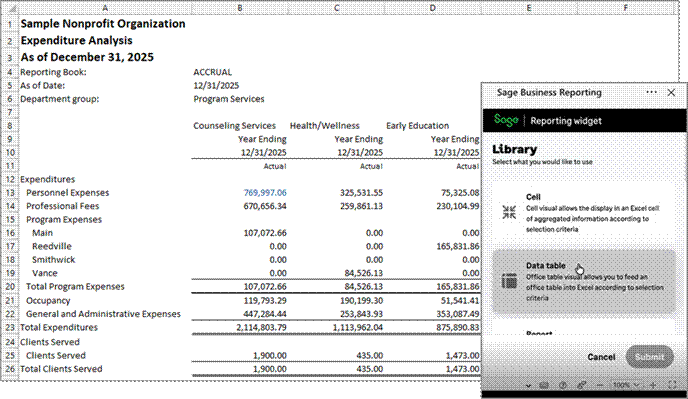
Smart Excel Reporting – Early Adopter
Use Sage Financial Data to build reports directly in Microsoft Excel.
The financial data remains linked to the Excel report so that you can refresh it with the latest information as needed. Sage Intacct security permissions are applied for the linked data through Excel.
Key benefits
- Easily build Excel reports using Sage Intacct data.
- Refresh Excel report as needed for the latest information.
Sign up for Early Adopter access. If you’re selected for the program, you’ll receive an email outlining the program details, expectations, and next steps.
As part of the program, you’ll collaborate closely with the Product Manager and play an active role in sharing feedback about your experience.
No more spoilers!
The above are a few of our favourite changes in the latest release. More details can be found on all these plus more when you login to your Sage Intacct homepage. Alternatively, you can find further information by joining us at our Learning lab on Thursday 19th November at 12pm. Register Here or click here 2026 R4 Release Notes to read more about Release 4 2026

Should you want to discuss any of the changes or have any question please feel free to send us a message at customersuccess@acuity24.com or call us on 01932 237110