

Wondering what the journey to go-live looks like with a Sage Intacct implementation? While exact timing depends on the complexity, in this post we share an outline of a Sage Intacct implementation timeframe with Acuity24.
Implementing a new financial management system isn’t something you do often, which can be daunting for finance professionals and leaders at the outset. But with proper planning and the right business partner the process can be a seamless transition.
Here’s a clear overview of the Sage Intacct implementation process with Acuity24, along with realistic timescales to help you plan.
Sage Intacct Implementation Timescales
On average, Sage Intacct implementations can take between 6 to 16 weeks, depending on:
- The number of entities, locations or currencies
- Which modules are required (e.g. Accounts Receivable, Projects, Inventory, Contracts, etc.)
- Data volume and the migration complexity
- Internal resources and decision-making speed.
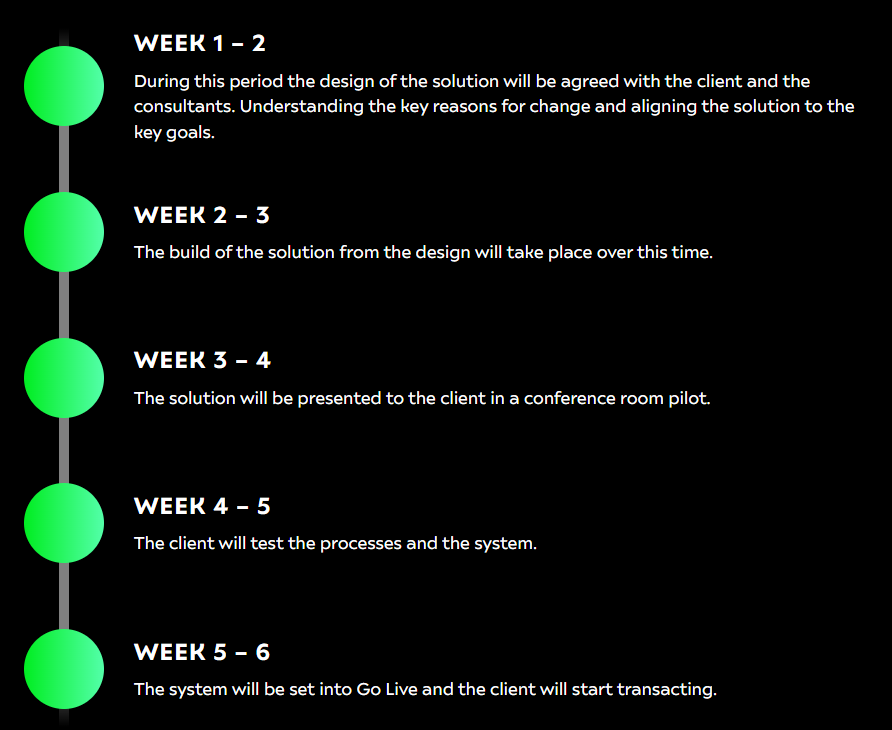
Smaller deployments are typically completed in 4 to 6 weeks with Acuity24, while complex, multi-entity global rollouts can extend to a few months.
Sage Intacct Implementation timeframe for less complex requirements:
Sage Intacct Implementation Step by Step
1. DISCOVERY AND PLANNING
This phase ensures your system is designed around your financial processes.
- Define goals, reporting needs, approval workflows and key stakeholders
- Scope required modules and integrations (CRM, payroll, billing systems, etc.)
- Build the project plan and assign responsibilities
2. SYSTEM CONFIGURATION
We configure Sage Intacct based on your business requirements.
- Set up chart of accounts, entities, departments, dimensions, users and roles
- Configure modules such as AP, AR, Cash Management, Fixed Assets, Projects or Contracts
- Build approval workflows and custom fields
3. DATA MIGRATION
Your historical data is cleaned, mapped and imported.
- Extract data from legacy systems (GL balances, vendors, customers, open transactions)
- Clean and format data (remove duplicates, standardise naming)
- Test data imports and validate accuracy
4. INTEGRATIONS AND CUSTOMISATION
If required, external systems are securely connected to Sage Intacct.
- API or connector-based integrations (Salesforce, payroll, expense tools, POS systems)
- Build dashboards, reports, and custom workflows
- Test automated processes end-to-end
5. USER TRAINING AND TESTING
End-users gain confidence before go-live.
- Role-based training sessions for finance teams and approvers – for extra free training see our video library!
- UAT (User Acceptance Testing) to verify real-life scenarios
- Make configuration tweaks based on feedback
6. GO-LIVE AND ONGOING SUPPORT
- Final data imports (e.g. opening balances, outstanding AP/AR)
- Switch over from legacy system to Sage Intacct
- On-hand support to troubleshoot any early issues
- Optional optimisation phase for automation, dashboards and advanced reporting
Why Choose Acuity24 as your Sage Upgrade Partner?
We’ve used our 30+ years of Sage solutions expertise to help customers migrate to Sage Intacct and Sage X3 with the support of our talented, dedicated team. We also offer:
- Flexible payment options (including Direct Debit and milestone billing).
- Fixed price services (no additional costs even if the project runs over).
- Free training and resources helping you get the most out of your investment.
See what our customers say and the benefits they’ve achieved since upgrading to Sage Intacct or Sage X3; VIEW OUR CASE STUDIES HERE.