

The second Sage Intacct release of 2026 is here!
The automatic update hit your screens on 8th May 2026 with even more new features and updates to make the most of! Here are our top 12 highlights of the new release:
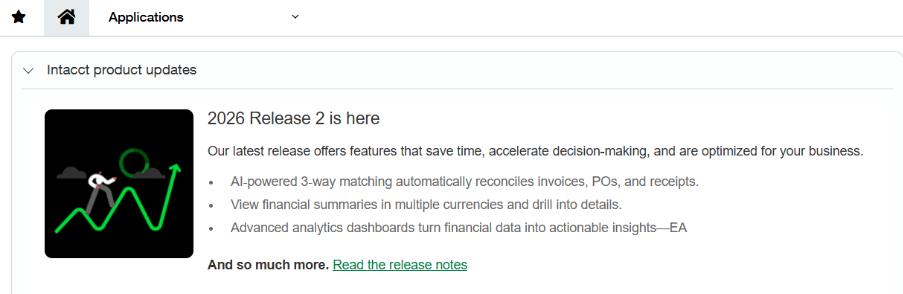
You may have seen the announcement on your Sage Intacct homepage, here are our top updates:
 Note: Some permissions have been added and changed to support the new features. New Permissions are automatically “OFF” by default and will need switching “ON” to use the features.
1. Intelligent 3-way matching with AP Automation
In this release intelligent 3-way matching strengthens AP Automation by introducing AI‑driven, line-level document matching across purchase orders, receivers, and PO purchase invoices. This enhancement increases accuracy, reduces manual intervention, and helps teams resolve discrepancies faster and with greater confidence.
To find out more details on the above new features – please visit here: 2026 R1 Release Notes
2. Streamlined roles permissions report for administrators
Administrators can now view a consolidated snapshot of all permissions assigned to a role in a single, standard report. The new report includes both standard and custom permissions.
The Roles permissions report aggregates all permissions associated with a role at a specific point in time. Administrators can quickly review role access without cross‑referencing multiple sources. Access to the new report is found via Company > Admin > History and reports section > Roles permissions report.
3. Improve AP bank remittances with entity-level logos
You can now upload entity‑level logos for AP bank remittance documents to clearly identify the issuing entity and meet regional compliance requirements where documents must reflect the correct entity.
Your entity-level logo will appear on bank remittance documents when the applicable template is used. If no entity-level logo is uploaded, your company logo will appear instead.
Additional capabilities for bank file remittances include:
- Set up custom remittance email templates specifically for bank file payments.
- Select configurable PDF remittance stubs (blank, with logo, or without logo).
For further details see the remittance release notes here
4. Updates to currency in payment posting
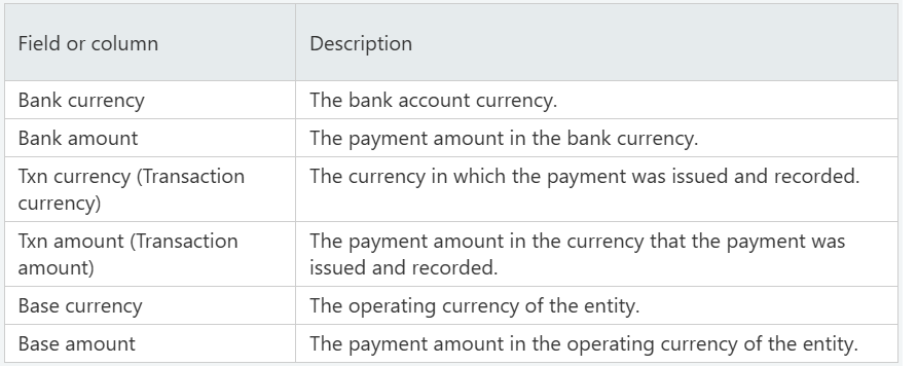
For those working in multi-currency, terminology updates have been made across Accounts Payable and Accounts Receivable to improve the distinction between currencies and amounts when multiple currencies are involved. This is in preparation for future multi-currency enhancement.
When using multi-currency, pages related to payments now show multi-currency related fields as follows:
5. Process customer refund payments through Accounts Payable
This release introduces a new way to process customer refunds by integrating Accounts Receivable and Accounts Payable workflows. You can now create refunds in Accounts Receivable that generate linked AP purchase invoices in Accounts Payable for payment processing. This approach helps enforce segregation of duties while making customer refunds easier to track and manage.
How it works:
- When a user processes a refund through Accounts Receivable, Intacct automatically creates a linked Accounts Payable AP purchase invoice that mirrors the refund.
- Accounts Receivable users continue to control refund creation, while Accounts Payable users manage the disbursement of funds using existing pay AP purchase invoices workflows. You can view and track refunds from both Accounts Receivable and Accounts Payable, with links between refunds, AP purchase invoices, and payments.
Please see here for further information
6. Updates to cash management
- Transactions you manually create during bank reconciliation from the ‘More actions’ menu, no longer default to the current date (in other words, the date you are working on the reconciliation). Instead, you must specify the actual transaction date, which is almost inevitably earlier.
- Creation rules now safeguard against using the same account for both sides of a transaction
- Limit the visibility of bank transactions based on user-level entity restrictions. Now, when you select the option to enforce user entity restrictions for bank and credit card accounts, the restrictions also apply to transactions. This means that a top-level user viewing the Bank transactions page will see only transactions for their entities’ accounts.
7. Multiple improvements across Fixed Asset Management
There are a number of improvements to be aware of to improve ease of use in Fixed Asset Management including:
- Reduce General Ledger volume by summarising depreciation postings across assets that share the same accounting attributes. Helping improve posting performance and making depreciation entries easier to review and reconcile. Previously, each depreciation entry created a separate journal entry.
- Split an asset into multiple assets (up to 20) when they need to be tracked separately. This gives you more flexibility to manage depreciation, transfers, and disposals without manual workarounds.
- Reverse depreciation postings instead of reverting. Correct depreciation mistakes without deleting journal entries or relying on manual workarounds. You can now reverse posted depreciation directly within Fixed Assets Management. Reversing creates an offsetting journal entry and preserves the original posting.
- Revert partial disposals. You can now revert the most recent partial disposal for an asset directly in Fixed Assets Management. This simplifies error correction and removes the need for manual General Ledger workarounds.
- Get more control over when and how you capitalise Construction in Progress (CIP) assets. You can now specify a capitalisation date that aligns with your accounting timelines and revert a capitalisation if you need to make changes.
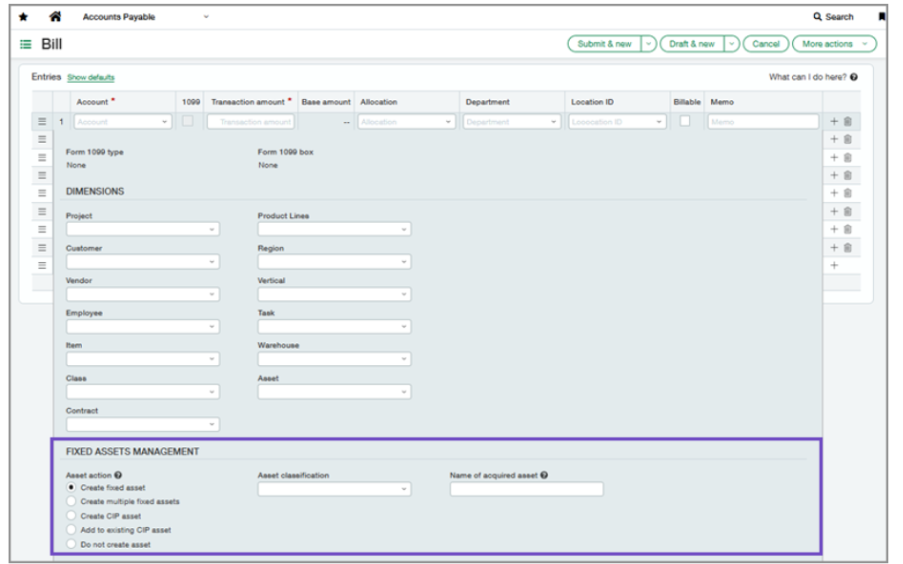
- Layout improvement have also been made with disposals being moved to a dedicated tab and the FAM section in AP and purchasing being move below the dimensions section.
8. Centralised inventory term attachments
Increase operational efficiency with centralised item reference documentation. Now upload, store, and view item-related attachments such as images, specification sheets, Material Safety Data Sheet (MSDS) files, and installation guides. These attachments are accessible directly from an item record or through APIs, improving item identification, operational accuracy, and cross-team communication.
For further information please find the inventory release notes here
9. More control of transaction cost precision for inventory
By default, Inventory Control accepts 10 decimal places when items are added to transactions. After posting, 2 decimal places display when a transaction is opened in View or Edit mode. With this update, you can configure the number of decimal places that you want to display by default in your Inventory Control transactions.
10. Individual charges and invoices runs for Order Entry billing groups
Following the release of billing groups in R1, this release includes the following billing group enhancements:
- Individual charges: Billing groups now support charges associated with a specific customer. Individual charges are included only on that customer’s invoices during billing group invoice generation. You can add and manage individual charges from the billing group, customer record, or Individual Charges list.
- Invoice Runs list: The Invoice Runs list displays invoice runs across all billing groups, with drill-down access to run-level and invoice-level details.
- Customer billing groups tab: Customer records now include a Billing groups tab, which shows the billing groups and individual charges associated with that customer.
- Inline charge entry: Charges are now entered inline in a grid, instead of through a separate entry page.
- Billing group schedule frequencies: Billing groups now support Semi‑monthly and End of month schedules. The Days frequency has been removed to align with common billing practices.
- Navigation update: Billing groups are now found on the All tab in Order Entry instead of the Setup tab.
11. Project & Grant financial summary enhancements
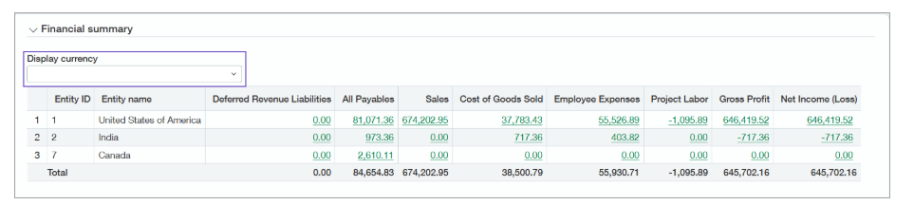
You can now switch between currencies and view the results in the project financial summary on the Project summary tab located on the Project information page. By default the values in the Financial summary section of the Project summary are displayed in the base currency.
When you make a selection from the Display currency dropdown menu, the financial summary values update instantaneously. The values are calculated by using the Intacct Daily Rate.
With the proper permissions, you can drill down to the financial data and see the details in a General Ledger report.
More information on the financial summary enhancements can be found here
12. Updates and enhancements for taxes
The tax updates in this release cover:
- Ability to enter partial exemption directly at the top level for your Accounts Payable transactions. This makes it easier to apply partial exemption to supported transactions.
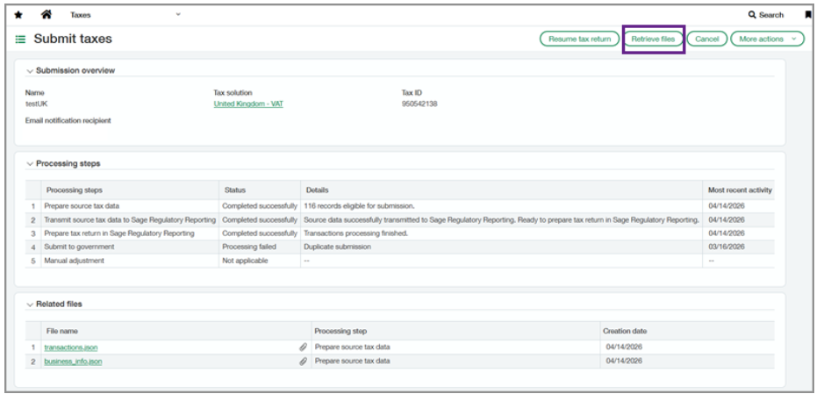
- Manually retrieve missing tax submission files. You can now manually retrieve missing tax submission files from when a submission is marked as completed, but the files, bundle number, or submission receipt are not automatically retrieved from Sage Regulatory Reporting. Tax submission files are retained for 30 days after the submission date.
COMING SOON
With this release Sage have announced lots of exciting new features currently in the Early Adopter phases. You can read more about these and how to get involved in the release notes.
As an early adopter, you can influence how Sage develop the product working closely with Sage Intacct product managers to ensure focus is on what matters most to you. Early adopter participants are expected to periodically respond to surveys and provide input.
Some of these programmes include:
Custom Purchasing approvals—Early Adopter
Reduce manual effort while strengthening control over purchasing approvals and helping to support compliance.
Configure custom approval workflows for Purchasing transactions using flexible, rule‑based logic. With custom Purchasing approvals, administrators can define approval rules based on supplier attributes, payment priority, and transaction amounts to automatically route Purchasing transactions to the appropriate approvers.
To be considered for the Early Adopter program, complete this form today.
Finance Intelligence agent—Early Adopter Extended
The Finance Intelligence agent is your Sage Ai-powered partner that helps you find answers about your financial data and complete tasks faster. Using Sage Copilot, you can ask questions, get insights, analyse data, and take actions all by using natural language.
Key benefits
The Finance Intelligence agent enables you to:
- Retrieve and aggregate data instantly across your financials.
- Perform analysis to uncover what’s driving the numbers.
- Get predictions and recommendations for better decision-making.
- Understand the “why” behind every answer with clear, transparent reasoning.
If you would like to be considered to be an early adopter of the Finance Intelligence Agent, take this short survey.
The Early adopter programme has been extended for Cash requirements. The Cash requirements feature lets you view amounts for payables, receivables, and bank balances on a single page to help efficiently surface cash flow insights.
And now you can quickly act on those insights to send automatic payment reminders to selected customers—accelerating collections and improving cash flow right when you need to most.
If you want to be considered for the Early Adopter program, complete this form today.
No more spoilers!
The above are a few of our favourite changes in the latest release. More details can be found on all of these plus more when you login to your Sage Intacct homepage. Alternatively, you can find further information by joining us at our Learning lab on Thursday 28th May at 12pm. Register Here or click here 2026 R2 Release Notes to read more about Release 2 2026
Should you want to discuss any of the changes or have any question please feel free to send us a message at customersuccess@acuity24.com or call us on 01932 237110