
AP and Purchasing Automation in Sage Intacct
Managing accounts payable doesn’t have to be time-consuming. With Sage Intacct AP Automation, finance teams are eliminating manual data entry, reducing errors, and speeding up their approval workflows.
AP Automation is available in both Accounts payable and Purchasing, leveraging AI to streamline the process of drafting invoices and matching invoices to purchasing transactions. Explore more Sage Intacct integrations now!
Traditional AP processes often mean:
- Manually keying in invoice data
- Chasing down approvals over email
- Bottlenecks
- Worrying about duplicate payments
- Missed due dates impacting supplier relationships
These tasks take valuable time away from the work that matters most.
With AP Automation, you can:
Reduce effort with invoices captured using AI
- The automated billing process is triggered by the following events:
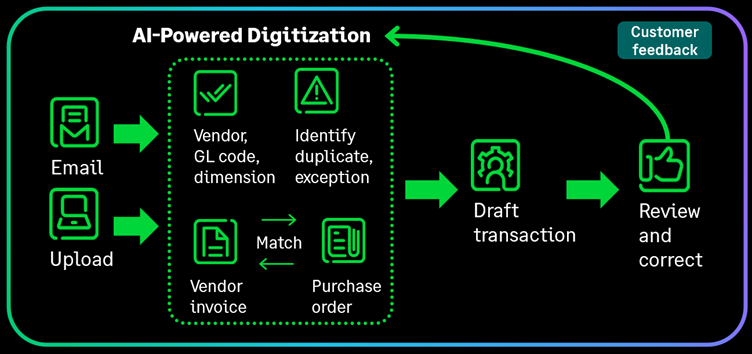
- You upload AP purchase invoices within Intacct, using the Upload button on the AP purchase invoices list.
- You forward AP purchase invoices to the email address Sage provide per entity.
- For each AP purchase invoice document you submit, the system creates a corresponding Sage Intacct AP purchase invoice in draft state and attaches the original AP purchase invoice document.
- Use AP Automation with Purchasing and you define which Purchasing transactions you want to automate. You can elect to automate transactions with document matching, without document matching, or both.
Improve Accuracy with automated matching and validation help prevent duplicates and errors
- Using artificial intelligence and machine learning (AI/ML), Intacct fills in AP purchase invoice details automatically matching supplier information and including:
- Data captured from the uploaded or emailed AP purchase invoice, such as the AP purchase invoice number, date, line items, and amounts
- Details from the supplier record
- GL account and dimension coding, based on your previous coding patterns
- Additional machine learning insights learned from your corrections
- When the analysis is complete, AP Automation saves the AP purchase invoice as a draft, ready for you to review and then submit or post. Set split screen in your preferences to easily review the entry and document on one screen.
- The system flags duplicate invoices helping you to prevent errors.
Increase controls with automatic matching of invoices to PO’s
- When matching is configured, AI matches the purchase invoice to an existing purchasing transacting transaction.
- The system creates a draft transaction for you with the source document attached.
Streamline approvals and route invoices to the right
- Quickly process invoices and submit the invoice for approval before posting.
- Route invoices to the right people based on supplier, department, or amount, with clear audit trails.
- The original invoice document is attached to the draft invoice, making it easy to review and approve.
If you are ready to take advantage of smarter and faster AP workflows contact our Customer Success Team to find out more or get in touch via our contact form.