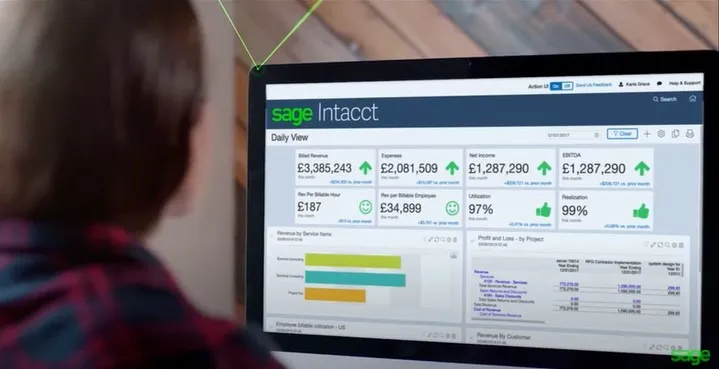

Sage Intacct is a cloud-native financial management system built for growing, multi-entity and service-led organisations that need real-time reporting, automated consolidation and finance automation. Sage 200 is a long-established South African business management system that combines accounting with stock, purchasing and commercial operations, available in the cloud (Sage 200 Standard) or on-premise and hosted (Sage 200 Professional).
If your priority is finance-led growth across entities, currencies or locations, Sage Intacct is usually the stronger fit. If stock and operational processes sit at the centre of your business, Sage 200 may still serve you well. Below, we compare the two across deployment, core accounting, multi-entity, reporting, automation, integration, security, ease of use and cost, so you can see where each one fits and when moving from Sage 200 to Sage Intacct makes sense.
Already decided to move? See how a Sage 200 to Sage Intacct migration works.
Sage Intacct vs Sage 200 at a glance
Here is how the two systems compare on the points South African finance teams ask about most.
| Area | Sage Intacct | Sage 200 |
|---|---|---|
| Best suited to | Growing, service-led and multi-entity organisations that need finance automation and real-time reporting | South African SMEs that need accounting alongside stock, purchasing and commercial operations |
| Deployment | Cloud-native, accessed through a web browser and updated automatically by Sage | Sage 200 Standard in the cloud; Sage 200 Professional on-premise or hosted by a partner |
| Multi-entity and multi-currency | Automated consolidation, intercompany elimination and cross-entity reporting | Multiple companies and currencies supported; consolidation is often more manual |
| Reporting | Real-time dashboards, multi-dimensional reporting and drill-down to transactions | Built-in reports and dashboards, with Excel often used for bespoke analysis |
| Automation | Recurring entries, allocations, approvals and continuous close | Core workflows, with more manual steps for allocations and consolidation |
| Integration | Open APIs and a marketplace of pre-built connections, including Salesforce | Microsoft 365, Power Platform, Sage CRM and payroll; other systems may need custom work |
| Security and updates | Bank-level security, GDPR-compliant, with automatic updates | Depends on edition and hosting; on-premise updates are managed by you or your partner |
| Cost model | Modular subscription: pay for the modules and users you need | Subscription licences by edition, users and companies, plus hosting or infrastructure costs |
Outgrowing Sage 200?
Deployment and updates
Sage 200:
- Sage 200 Standard runs in the cloud; Sage 200 Professional is installed on-premise or hosted by a partner
- Professional deployments need servers, backups and IT support, managed by you or your IT provider
- Version upgrades are planned and scheduled rather than automatic
Sage Intacct:
- Cloud-native software as a service, accessed through any web browser
- Sage manages the infrastructure, backups and updates, and new features arrive automatically
- No servers to buy or maintain
Bottom Line:
If you want to remove the infrastructure burden and give your team secure access from anywhere, Sage Intacct’s cloud-native architecture has the edge.
Core accounting
Sage 200
- Strong core financial capabilities for small-to-medium South African businesses
- Handles general ledger, payables, receivables, nominal coding and reporting
- Stock and commercial modules sit alongside the financials in one system
Sage Intacct
- Advanced core financial engine with multi-dimensional reporting
- Dimensions such as department, location and project on every transaction, without a complex chart of accounts
- Automated journal entries and allocations
- Strong audit trails and built-in controls
Bottom Line:
Both cover core accounting well. Sage Intacct adds more automation and control, with far less manual reconciliation.
Multi-entity, multi-currency and growth
How do Sage Intacct and Sage 200 handle multiple companies?
Sage Intacct runs multiple entities, currencies and locations from a single system, with consolidation and intercompany elimination automated, and adding an entity is a configuration task rather than a new installation. Sage 200 supports multiple companies and currencies, but consolidation and intercompany processes often rely on manual steps or spreadsheets. For groups that are adding entities, this is usually the deciding difference.
Sage 200
- Supports multiple companies and currencies
- Consolidation and intercompany processes often rely on manual steps or spreadsheets
- Stock control built in, with manufacturing available through additional modules
Sage Intacct
- Built for multiple entities, currencies and locations from a single system
- Automated consolidation and intercompany elimination
- Adding a new entity is a configuration task, not a new installation
Bottom Line:
If you run several companies, subsidiaries or currencies, or plan to, Sage Intacct significantly reduces manual effort and the risk of error.
Running several entities on Sage 200 today? See how we plan a Sage 200 migration.
Reporting and analytics
Sage 200
- Built-in reports and dashboards that cover standard needs well
- Often relies on exports to Excel for bespoke analysis
Sage Intacct
- Interactive real-time dashboards
- Multi-dimensional reporting without spreadsheets
- Drill down from a summary figure to the underlying transaction
- Embedded analytics support scenario modelling
Bottom Line:
Sage Intacct gives finance leaders up-to-the-minute visibility for faster decisions. Explore Sage Intacct reporting in more detail.
Automation and workflow
Sage 200
- Handles core processes reliably, with approvals, allocations and consolidations more often managed by hand
- Limited automated journal entries
Sage Intacct
- Automates routine processes like invoicing, approvals, allocations and recurring entries
- Supports continuous close and configurable approval workflows
- Reduces manual tasks and improves accuracy
Bottom Line:
Automation in Sage Intacct shortens month-end and frees your finance team for analysis rather than processing.
Integration
Sage 200:
- Integrates with Microsoft 365, Power Platform, Sage CRM and payroll
- Other third-party systems often need custom development or middleware
Sage Intacct:
- Open APIs and a wide marketplace of pre-built integrations, including Salesforce
- Designed to sit at the centre of a cloud technology stack
Bottom Line:
Sage Intacct makes it simpler to connect the systems your business already uses. View the Sage Intacct marketplace.
Security and compliance
Sage 200:
- Security depends on the edition and how it is hosted
- For on-premise deployments, patching and updates depend on your IT team or partner
Sage Intacct:
- Bank-level security, GDPR-compliant, with automatic patches
- Built-in audit trails and internal control features
- Easier compliance with external regulations
Bottom Line:
Sage Intacct takes security maintenance off your team’s plate and keeps you audit-ready.
Ease of use
Sage 200:
- A capable, familiar interface for established users
- New and non-finance users can face a steeper learning curve, particularly where the system has been heavily customised
Sage Intacct:
- A modern, browser-based interface with role-based dashboards
- Designed for finance professionals and non-finance budget holders alike
Bottom Line:
Sage Intacct makes it easier to open up financial information to the wider business.
Cost
Sage 200:
- Subscription licences priced by edition, users and companies
- Hosting or infrastructure and maintenance costs for on-premise deployments
Sage Intacct:
- Modular subscription pricing: pay for the modules and users you need
- Predictable monthly costs and no infrastructure spend
Bottom Line:
Compare the total cost of ownership, including IT, upgrades and manual effort, not just the licence fee. Get an indicative Sage Intacct price.
Should you choose Sage Intacct or Sage 200?
Choose Sage Intacct if you run, or plan to run, multiple entities, currencies or locations, want automated workflows and real-time reporting, or are a service-led organisation such as a professional services firm or not-for-profit. Sage 200 may suit a South African SME where stock, purchasing or manufacturing sit at the centre of the business and multi-entity reporting is not a priority.
Sage 200 may suit you if:
- You are a South African SME with straightforward accounting needs
- Stock, purchasing or manufacturing sit at the centre of your operations
- Multi-entity reporting is not a priority
- Your team has deep Sage 200 expertise and established processes
- You have limited need for advanced automation or real-time analytics
Sage Intacct is likely to suit you if:
- You plan to grow, or already run multiple entities, currencies or locations
- You want automated workflows and real-time financial insight
- Your finance team needs strategic reporting and deeper analysis
- You are a service-led organisation, such as professional services or not-for-profit
- You want a cloud-native platform that reduces IT overhead and supports remote working
Signs it is time to move from Sage 200 to Sage Intacct
If several of these sound familiar, it may be time to look at the move.
| What you notice in Sage 200 | How Sage Intacct handles it |
|---|---|
| Consolidation and intercompany work done by hand or in spreadsheets | Automated consolidation and intercompany elimination |
| Bespoke reporting exported to Excel | Real-time dashboards and multi-dimensional reporting, with drill-down to the transaction |
| Approvals and allocations managed by hand at month-end | Automated approvals, allocations and recurring entries, supporting continuous close |
| Servers, backups and planned upgrade projects (Sage 200 Professional) | Sage manages the infrastructure, and updates arrive automatically |
| New and non-finance users find the system hard to pick up | A browser-based interface with role-based dashboards for budget holders |
| Connecting other systems needs custom development | Open APIs and pre-built integrations, including Salesforce |
Sage Intacct sounds like the right fit, or still not sure? Our Sage 200 migration review looks at how you use Sage 200 today and shows you where Sage Intacct would make a difference.
Sage Intacct vs Sage 200: frequently asked questions
It depends on what your business needs. Sage Intacct is usually the better fit for growing, service-led or multi-entity organisations that want real-time reporting, automated consolidation and a cloud-native platform. Sage 200 can suit UK SMEs whose priority is managing stock, purchasing and commercial operations alongside their accounts.
Sage 200 Standard runs in the cloud, while Sage 200 Professional is installed on-premise or hosted by a partner. Sage Intacct is different: it was built for the cloud from the start, runs in a web browser and is updated automatically by Sage.
Yes. Many UK businesses move from Sage 200 to Sage Intacct as they grow. Acuity24 plans the move with you, from mapping your chart of accounts and data to training your team, with fixed price services and unlimited access to our team for 24 months after go-live. See how a Sage 200 migration works.
Licence costs depend on the modules, users and entities you need, so the best comparison is total cost of ownership. Sage Intacct has no servers or upgrade projects to fund and automates work that is often manual in Sage 200. Take our 2 minute price check for an indicative Sage Intacct price.
Yes. Sage Intacct is designed for multi-entity and multi-currency organisations, with automated consolidation, intercompany elimination and reporting across all entities from a single system.
How do you move from Sage 200 to Sage Intacct?
Moving from Sage 200 to Sage Intacct starts with a review of how you use Sage 200 today. Acuity24, a Sage partner for over 30 years, then maps your data, migrates it, trains your team and takes you live on a fixed price, with unlimited support for 24 months after go-live. Our Sage 200 migration page sets out each stage.